LodgedAustralian visa tracker
Nº 01 For Australian visa applicants iPhone · Android Beta open

You've lodged. Now, the wait.

Lodged keeps your Australian visa in one calm place: every date that matters, every document that can expire, and an honest sense of how long is left.

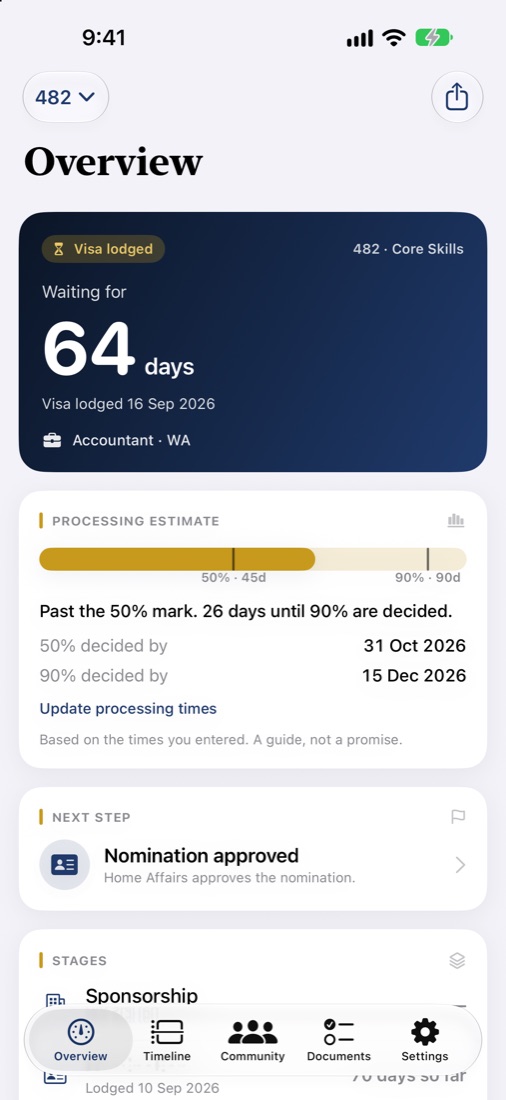
Lodged showing a 482 visa: 64 days since lodgement, with the processing estimate past the 50% mark.
Fig. 1Home, a 482 visa
16Australian visas tracked
60 daysLodge window, counted for you
WeeklyOfficial processing times refreshed
I. The route

Every visa is a route.

A 190 waits on a state. A 482 waits on an employer. Lodged draws your route with only the stops that apply to you, and shows where you are on it today.

  1. Stop 01Get ready

    Skills assessment, English test, points. Your occupation, checked against the official list.

  2. Stop 02Put your hand up

    An EOI in SkillSelect, a state nomination, or an employer's nomination.

  3. Stop 03Invited

    Sixty days to lodge. Lodged counts them down and reminds you before time runs out.

  4. Stop 04Lodged

    The long middle. Day counts, official times and real grants, so you know where you sit.

  5. Stop 05Granted

    The good email. Then perhaps the next visa, tracked alongside.

II. Inside the app
i
The countdown

Know the day,not just the date.

Open Lodged and the answer is already there: how long you've been waiting, what comes next, and where you sit against the official processing times.

  • Day countDays since lodgement, or since your EOI, at a glance.
  • Lodge-by countdownSixty days from your invitation, with reminders 14 and 3 days out.
  • Official timesHome Affairs' 50% and 90% figures, checked every week and sent straight to your phone, no update needed.
  • EOI pointsPick each factor from what qualifies and Lodged adds up your total.
  • More than one visaA 482 and the 186 that follows it, side by side.
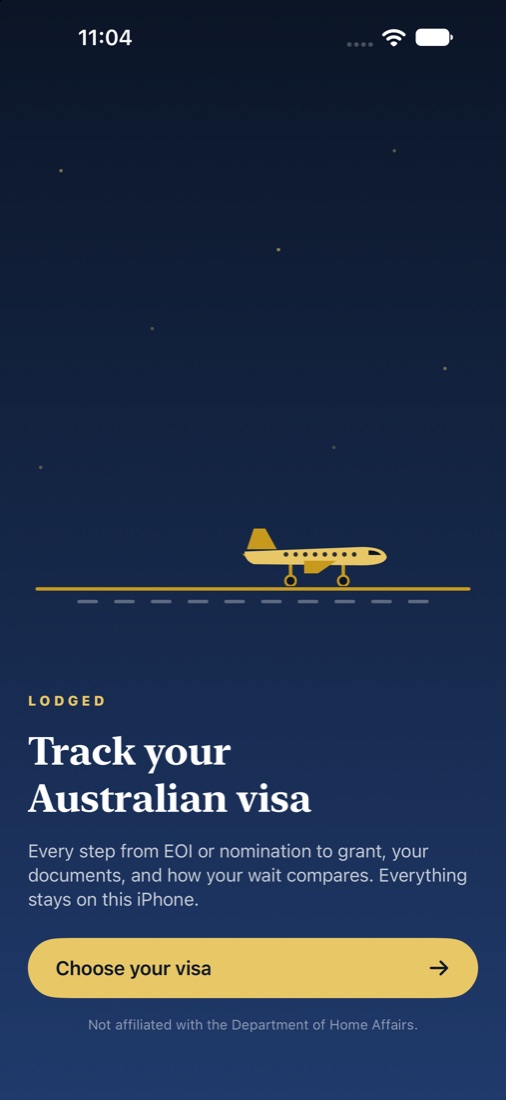
Lodged welcome screen: a gold plane landed on a runway under a navy sky.
Fig. 2Choosing a visa
ii
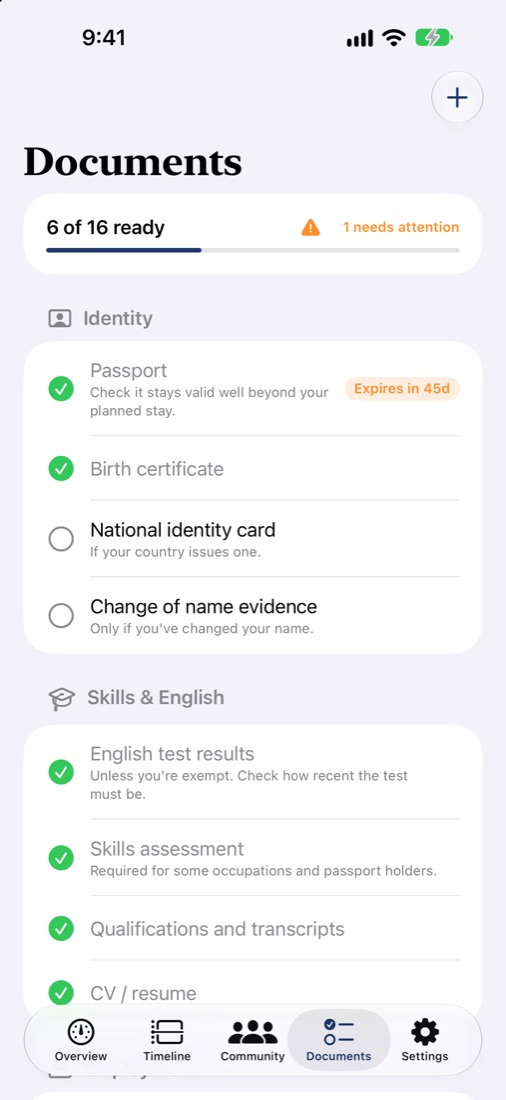
Lodged document checklist: 6 of 16 ready, with a passport flagged as expiring in 45 days.
Fig. 3Document checklist, 6 of 16 ready
The papers

Nothing quietlyexpires.

A checklist made for your visa, grouped the way case officers think about it. Add an expiry date and Lodged watches it for you.

  • A few at a timeSet up in four short steps: passports and ID, English and skills, police and health, then the rest.
  • Done onceA skills assessment or English test counts for every visa you track.
  • Expiry remindersThirty days before, and on the day.
  • Occupation listSearch by name or ANZSCO code, see your visa's list and your assessing authority.
iii
The company

Waiting is easierin company.

Official times average everyone. Insights shows how people in your exact visa and stream are going, Community is where they talk, and News has what Home Affairs and the states have just announced.

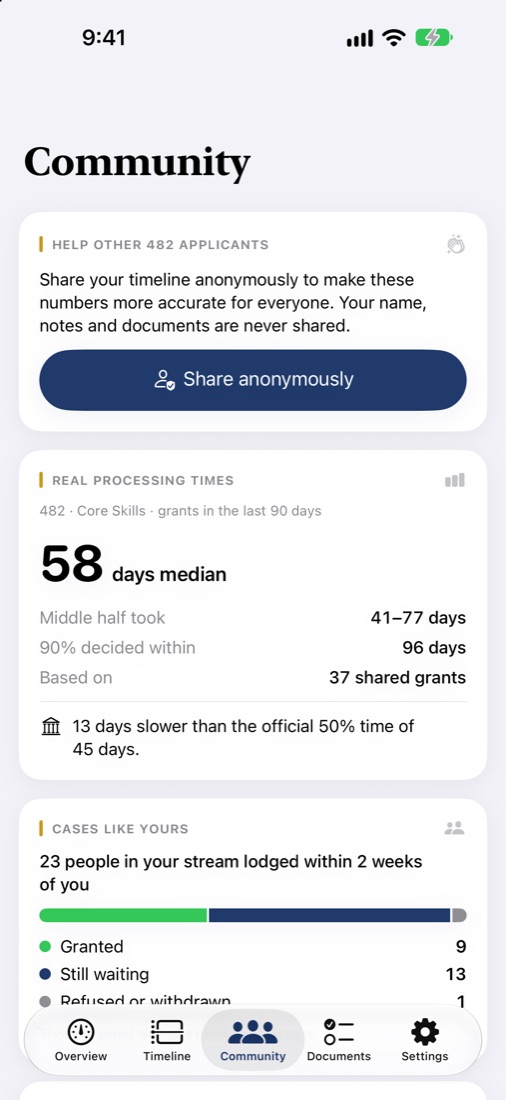
  • InsightsYour place in line, a likely grant window and the pace of grants, from timelines shared anonymously.
  • CommunityA discussion forum for each visa. Post as Anonymous or by first name; moderated, with report and block.
  • NewsHome Affairs and state announcements for your visa, newest first.
  • Invitation roundsEvery state's 190 and 491 rounds, confirmed or expected, with past results.
  • Safety in numbersNo insight appears until at least five people match.

Screenshot shows sample data. Insights grow as more people share.

Lodged Insights tab with a median processing time from shared grants.
Fig. 4Insights, a 482 Core Skills stream

Stop refreshing ImmiAccount. Start knowing where you stand.

III. Departures

Sixteen visas,and counting.

SubclassVisaClassLodged gives you
189Skilled IndependentSkilledTracking · Insights · Community
190Skilled NominatedSkilledTracking · Insights · Community
491Skilled Work RegionalSkilledTracking · Insights · Community
482Skills in DemandEmployerTracking · Insights · Community
186Employer Nomination SchemeEmployerTracking · Insights · Community
494Skilled Employer Sponsored RegionalEmployerTracking · Community
407TrainingEmployerTracking · Community
191Permanent Residence (Skilled Regional)SkilledTracking · Community
858National InnovationSkilledTracking · Community
500StudentStudyTracking · Community
590Student GuardianStudyTracking · Community
485Temporary GraduateStudyTracking · Community
309Partner, outside AustraliaFamilyTracking · Community
820Partner, in AustraliaFamilyTracking · Community
300Prospective MarriageFamilyTracking · Community
600VisitorVisitorTracking · Community
IV. Privacy

Your visa isyour business.

  1. Article 1

    Anonymous, or not at all

    Community sharing is optional. It uses a random ID, never your name or email, and a number only appears once five people match. In Community discussions you choose, post by post, to be Anonymous or a first name.

  2. Article 2

    Yours to take back

    Stop sharing, or delete what you shared and your account, from inside the app. Lock Lodged with Face ID or your fingerprint if you like. Data is stored in Sydney.

  3. Article 3

    Nothing to sell

    No tracking, no analytics, no ad networks. Lodged makes nothing from knowing who you are.

The full detail is in the privacy policy.

V. Boarding · Beta

Boarding now,in beta.

Lodged is in beta on iPhone and Android. Leave your email and we'll send you an invite, usually within a day or two. It's free, and what you tell us shapes what we build next.

Boarding pass · Lodged beta
  1. Leave your emailThe one you'd like your TestFlight invite sent to.
  2. Install TestFlightApple's free app for beta testing, from the App Store.
  3. Open the invite on your iPhoneTap the link in our email, then Install. Needs iOS 17 or later.
  4. Choose your visa, add your datesAllow notifications so Lodged can remind you before deadlines.
PassengerYou
ClassBeta
iPhoneiOS 17+
Android8.0+

We only use it to send your invite and beta news. See the privacy policy.

Flight log · What's new in the beta

Lodged changes every few days while testers tell us what to fix. The latest:

  1. Fixes from testers' reportsSmoother on Mac, setup asks for the dates each visa needs (like the 485's course completion), fees for more visas, and a skills assessment or English test now counts for every visa you track.
  2. A new look to start withThe splash, sign-in and code screens, redrawn in navy and gold.
  3. Discussions, News and Invitation roundsA forum for every visa, Home Affairs and state news, and each state's 190 and 491 rounds. Follow other states if your EOI is in more than one. Employer steps are optional on the 482, 494 and 407, and the timeline warns when dates are out of order.
  4. Beta opensSign in with Apple, an optional app lock, an EOI points picker, a hub of official resources, and processing times that update without an app update.
VI. Questions

Before youboard.

Q.01

What does the beta mean for me?

You get Lodged before it reaches the App Store and Google Play, free. Beta versions update often and can have rough edges, so if something looks wrong or you have an idea, email support@lodged.org. iPhone testers can also send feedback from TestFlight: take a screenshot and tap Share Beta Feedback.
Q.02

Is Lodged an official government app?

No. Lodged is an independent personal organiser. It isn't affiliated with the Department of Home Affairs and doesn't give migration advice. Always check official sources or a registered migration agent.
Q.03

Which visas does it track?

Sixteen, from the skilled 189, 190, 491, 482 and 186 to student, graduate, partner and visitor visas. See the departures board. Community insights cover the five skilled visas for now.
Q.04

How does the sixty day countdown work?

For invitation-based visas like the 189, 190 and 491, add the date of your SkillSelect invitation. Lodged counts down to sixty days after it, the usual time limit to lodge, and reminds you 14 days and 3 days before and on the day. Always check the exact date on your invitation letter.
Q.05

Where do the processing times come from?

Two places. The official 50% and 90% times come from the Department of Home Affairs website, which we check every week. Community insights come from timelines shared anonymously by other applicants in your visa and stream.
Q.06

Why does it say there isn't enough data yet?

Numbers only appear once at least five people with the same visa and stream have shared, so nobody can be identified. Sharing your own timeline helps fill them in for everyone.
Q.07

Is there a web version?

Not yet. Lodged starts on iPhone and Android, so your reminders are always with you. A web version is planned.
Q.08

How do I delete my data?

On the Account tab, tap your name or email, then Delete account to delete your account and everything in it. To take back only what you shared, choose Stop sharing on the Insights tab. The privacy policy has the details.